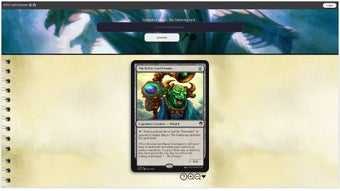

Download MTG Card Creator – AI‑Powered Custom Card Generator for Magic: The Gathering
MTG Card Creator is a cutting‑edge, AI‑driven tool that lets Magic: The Gathering fans design their own custom cards in a matter of seconds. Powered by the latest GPT‑Turbo chatbot technology, the application interprets natural‑language prompts and transforms them into fully‑formatted, print‑ready cards that look and feel like official Wizards of the Coast releases. Whether you want to conjure a legendary dragon with haste, sketch a wizard sub‑type that grants hex‑proof, or experiment with holo‑foil finishes for a collector‑grade look, MTG Card Creator offers an intuitive interface that blends creativity with professional‑grade design. The software is positioned as both a hobbyist playground and a potential commercial resource for artists, stream‑liners, and tournament organizers who need high‑quality custom cards without the steep learning curve of traditional graphic suites. Its secure, free‑to‑download nature makes it accessible to anyone with a Windows, macOS, Android, or iOS device, while regular updates ensure the AI model stays aligned with the ever‑expanding MTG card taxonomy.
Key Features That Make MTG Card Creator Stand Out
- AI‑Powered Prompt Engine: Type a description such as “a red dragon with haste and firebreath” and watch the AI instantly generate a complete card layout, including name, mana cost, artwork suggestions, and abilities.
- Editable Holo‑Foil Templates: Choose from a library of holo‑foil styles and fine‑tune every layer—border, title frame, and rarity symbol—to produce collector‑grade finishes.
- Full MTG Syntax Support: The tool recognises all official card types (creature, sorcery, instant, planeswalker, etc.) and sub‑types (wizard, elf, zombie) ensuring that generated cards follow the same rules as sanctioned cards.
- Instant Preview & Export: Real‑time visual preview lets you see changes on the fly; export options include high‑resolution PNG, PDF for printing, or a ready‑to‑share image for social media.
- Cross‑Platform Accessibility: Available as a desktop client for Windows 10/11 and macOS 12+, plus companion apps for Android 8+ and iOS 13+, all synchronized through a cloud‑based account.
- Secure & Private: All AI processing happens locally after the initial model download, meaning your creative prompts never leave your device unless you choose to share them.
- Regular Content Updates: New card frames, set‑specific motifs, and seasonal art packs are released monthly, keeping the tool fresh and aligned with the latest official sets.
Installation, First‑Run Setup, and Everyday Usage
Getting started with MTG Card Creator is deliberately straightforward. Begin by visiting the official website and clicking the Download button that matches your operating system. The Windows installer is a single .exe file, while macOS users receive a signed .dmg package.
For mobile devices, the app is listed in the Google Play Store and Apple App Store under the same name. After the download completes, run the installer and follow the on‑screen wizard: accept the license agreement, choose an installation folder (the default works for most users), and let the program install the necessary AI model files—approximately 1.2 GB of data. Once installed, launch the application; the first launch will prompt you to create a free account or continue as a guest.
An account provides cloud sync for your designs, while the guest mode stores everything locally.
The main interface consists of three panels: a prompt input field on the left, a live preview canvas in the centre, and a toolbar of customization options on the right. To design a card, simply type a concise prompt—e.g., “Legendary phoenix, 3RR, flying, haste, rebirth when it dies”—and press Generate. Within seconds, the AI returns a full card layout.
You can then tweak any element: adjust the mana cost, replace the auto‑selected artwork with your own PNG, or toggle the holo‑foil effect. The toolbar also houses a Save button that writes the card to your library, a Export menu for PNG/PDF, and a Share feature that creates a short link for community feedback. Keyboard shortcuts (Ctrl + Z for undo, Ctrl + S to save) make the workflow feel native to seasoned designers.
Finally, the Settings tab lets you enable automatic updates, choose a dark or light UI theme, and manage privacy preferences.
Compatibility, Pros & Cons, and Frequently Asked Questions
MTG Card Creator runs on the latest consumer operating systems. For desktop, Windows 10/11 (64‑bit) and macOS 12 Monterey or later are officially supported. The mobile companion apps require Android 8.0 (Oreo) or newer, and iOS 13 or later. Because the AI engine is compiled to run on both Intel/AMD and Apple Silicon, performance remains smooth across a wide range of hardware, from budget laptops to high‑end gaming rigs. The cloud‑sync feature works with any internet‑connected device, ensuring your card library follows you whether you switch from a Windows PC to an iPad.
Pros
- Fast AI generation eliminates manual layout work.
- Professional‑grade holo‑foil and set‑specific frames.
- Cross‑platform support with seamless cloud sync.
- Zero‑cost entry level; free updates keep the tool current.
- Privacy‑first design; prompts never leave your device unless you share.
Cons
- Initial model download can be large for users with limited bandwidth.
- Advanced graphic tweaks (e.g., custom borders) still require external editors.
- Free version limits cloud storage to 100 cards; larger libraries need a paid plan.
Frequently Asked Questions
Is MTG Card Creator really free?
Yes, the core application is free to download and use. The free tier includes unlimited card generation, basic holo‑foil styles, and up to 100 cloud‑synced cards. A premium subscription unlocks expanded storage, exclusive art packs, and priority AI model updates.
Can I print the cards for real‑life gameplay?
Absolutely. Exported PDFs meet the dimensions and bleed requirements of standard Magic cards, so you can print them on cardstock or use a professional printing service. Just remember that unofficial cards are not tournament‑legal unless approved by the event organizer.
How does the AI handle copyrighted artwork?
The AI suggests royalty‑free or public‑domain artwork by default. If you upload your own image, the tool respects your ownership and does not distribute the file beyond your device unless you choose to share it.
Is there a mobile‑only version, or do I need the desktop app?
The mobile apps are fully featured and allow you to generate, edit, and export cards directly on your phone or tablet. However, the desktop client provides a larger canvas for detailed artwork work and may be preferable for power users.
Will my designs be safe from malware or data leaks?
MTG Card Creator is signed by a reputable developer and distributed through official channels only. The AI runs locally after the initial model download, so your creative prompts stay on your device unless you explicitly share them via the built‑in sharing feature.
Conclusion – Bring Your Magic Ideas to Life Today
In a market crowded with generic graphic editors, MTG Card Creator shines as a purpose‑built, AI‑enhanced solution for every Magic enthusiast who wants to translate imagination into tangible cards. Its blend of rapid AI generation, professional holo‑foil styling, and cross‑platform availability removes the technical barriers that once made custom card design a niche hobby. While the free tier offers ample functionality for casual creators, the optional premium plan provides the scalability needed for serious artists or small‑scale commercial projects. Whether you’re crafting a homebrew set for a friendly game night, designing a prototype for a Kickstarter, or simply experimenting with legendary creature concepts, MTG Card Creator gives you the tools to do it quickly, securely, and with a polished finish. Download the app today, unleash your inner planeswalker, and start building the next generation of unforgettable Magic cards.
MTG Card Creator delivers a smooth, AI‑driven workflow that feels both powerful and approachable. The holo‑foil options add a professional polish, and the cross‑platform sync keeps my designs accessible everywhere. The only downside is the size of the initial download, but once installed, the experience is flawless.



.png)



